top of page
home
products
Bloom Infinity Series
Gnash Analog Distortion
Limbo Reverb
Verdict Poly Octaver
Vein Pitch Shifter
Rilum Multi-head Delay
Sprout Modulation
Everlast Delay
Accessories
Vires Power Supply
Mantra Dual EXP
Anima Dual Footswitch
Animus Dual Footswitch
manuals
support
FAQ
news
videos
contact us
distributors
Free US Shipping On All Orders | 1-Year Warranty | Secure Checkout
FAQ
There was a technical issue on our end. Try again or refresh.
Play Video
Play Video
00:34
Tutorials | How to update your KLOWRA pedals
Bringing your KLOWRA pedals home is just the beginning, we’ll keep upgrading its features and tone. Here’s how to enter install mode and set up the update software. More info here https://www.klowra.com/ Thx for watching. 💐 Follow Klowra Youtube/ @KlowraPedals Facebook/ https://www.facebook.com/klowra Instagram/ https://www.instagram.com/klowra_pedals/ TikTok/ https://www.tiktok.com/@klowra_pedals #klowra #klowrapedals #guitarpedals #firmware #firmwareupdate
Play Video
Play Video
00:20
Tutorials | How to adjust the LED button brightness
How to adjust the LED button brightness on Klowra Pedals for different lighting conditions such as bedroom, on stage, or during early morning and evening? Here is the tutorial. More info here https://www.klowra.com/ Thx for watching. 💐 Follow Klowra Youtube/ @KlowraPedals Facebook/ https://www.facebook.com/klowra Instagram/ https://www.instagram.com/klowra_pedals/ TikTok/ https://www.tiktok.com/@klowra_pedals #klowra #klowrapedals #guitarpedals #effectpedals #guitareffects
Play Video
Play Video
00:58
Tutorials | Freeze VS Infinite Mode from Limbo Reverb & Animus Dual Footswitch
This video provides a quick guide on how to use the Limbo Reverb and Animus Dual Footswitch to unlock Freeze or Infinite Mode, allowing you to fully showcase the sonic charm and versatility of the Limbo. 00:00 Enter Freeze Mode with Limbo 00:08 Use Freeze Mode on Animus Dual Footswitch 00:19 Switch between Freeze or Infinite Mode 00:30 Enter Infinite Mode with Limbo 00:37 Use Infinite Mode with Animus Dual Footswitch More info here https://www.klowra.com/limbo-reverb Thx for watching. 💐 Follow Klowra Youtube/ @KlowraPedals Facebook/ https://www.facebook.com/klowra Instagram/ https://www.instagram.com/klowra_pedals/ TikTok/ https://www.tiktok.com/@klowra_pedals #klowra #klowrapedals #guitarpedals #guitareffects #effectpedals
Play Video
Play Video
01:07
Tutorials | Tap Tempo VS Rhythm from Everlast Delay & Animus Dual Footswitch
Mastering the Tap Tempo and Rhythm functions is key to getting the most out of the Everlast Delay. We’ve included three rhythm modes: Quarter-note, Dotted eighth-note, and Eighth-note triplet. Of course, you can also experiment with a layback playing style to create some really interesting riffs. 00:00 How to Tap Tempo on Everlast 00:17 Quarter-note delay 00:32 Dotted eighted-note delay 00:48 Eighted-note triplet delay 💐 Follow Klowra Youtube/ @KlowraPedals Facebook/ https://www.facebook.com/klowra Instagram/ https://www.instagram.com/klowra_pedals/ TikTok/ https://www.tiktok.com/@klowra_pedals #klowra #klowrapedals #guitarpedals #guitareffects #effectpedals
Play Video
Play Video
01:14
Vein Pitch Shifter - We got the response latency down to 10 ms. | KLOWRA
It might fluctuate to 12 ms once in a while, but that’s negligible, it’s a solid 10 ms for the most part. Even if you're shredding at 170 BPM, the response is lightning-fast and the note definition is crystal clear. More info here https://www.klowra.com/vein-pitch-shifter Thx for watching. 💐 Follow Klowra Youtube/ @KlowraPedals Facebook/ https://www.facebook.com/klowra Instagram/ https://www.instagram.com/klowra_pedals/ TikTok/ https://www.tiktok.com/@klowra_pedals #klowra #klowrapedals #guitarpedals #pitchshifter #pitchshift
Play Video
Play Video
00:41
Tutorials | How to switch Bypass Modes
This tutorial shows how to switch between True Bypass and Buffered Bypass on KLOWRA pedals. Learn how to enter power up mode, toggle bypass modes, and understand the difference between cutting trails and letting trails continue when the effect is off. More info here https://www.klowra.com/ Thx for watching. 💐 Follow Klowra Youtube/ @KlowraPedals Facebook/ https://www.facebook.com/klowra Instagram/ https://www.instagram.com/klowra_pedals/ TikTok/ https://www.tiktok.com/@klowra_pedals #klowra #klowrapedals #guitarpedals #reverbpedal
Play Video
Play Video
01:55
Vein Pitch Shifter - What If Vein on Bass & Bass VI? | KLOWRA
Bassists, step forward and steal the spotlight from the guitarists and vocalists with the Vein Pitch Shifter! With latency as low as 10 ms, precise pitch tracking, and a buttery smooth wah. don’t worry about the guitarist marching toward you with a cattle prod, you can always glide back to the original pitch with one step, there's nothing they can do about it. This stage is YOURS. Download the Firmware here: https://www.klowra.com/manuals Thx for watching. 💐 Follow Klowra Youtube/ @KlowraPedals Facebook/ https://www.facebook.com/klowra Instagram/ https://www.instagram.com/klowra_pedals/ TikTok/ https://www.tiktok.com/@klowra_pedals #klowra #klowrapedals #guitarpedals #pitchshifter #pitchshifting #pitchshift
Play Video
Play Video
01:49
Vein Pitch Shifter - Brand New Sound | KLOWRA
After a long battle, countless cups of coffee, and more fallen hair than we’d like to admit, we’ve given the Vein Pitch Shifter a major overhaul. With optimized algorithms and brand new features, your Vein is now more powerful than ever and ready to spark even more inspiration. Vein Pitch Shifter Firmware Update v2.0.0 - Upgraded the Wildseed Engine for major improvements in pitch tracking performance and signal processing quality. - Reduced average response time to 10 ms for instant reaction to playing dynamics and pitch changes. - Enhanced low-frequency clarity for full compatibility with multi string guitars, baritone guitars, and bass. - Improved polyphonic resolution across the entire frequency spectrum, delivering a cleaner chord response and a more natural instrument tone. - Optimized the Wah pitch control experience via external expression pedals, making pitch transitions smoother and more organic. - Expanded the detune module’s adjustment range to achieve more extreme and wild micro vibrato textures. Download the Firmware here: https://www.klowra.com/manuals Thx for watching. 💐 Follow Klowra Youtube/ @KlowraPedals Facebook/ https://www.facebook.com/klowra Instagram/ https://www.instagram.com/klowra_pedals/ TikTok/ https://www.tiktok.com/@klowra_pedals #klowra #klowrapedals #guitarpedals #pitchshifter #pitchshifting #pitchshift
Play Video
Play Video
06:51
Gnash Distortion - Exploring Demo | KLOWRA
To shatter the myth that Klowra only masters ambient effects, our very first analog pedal - Gnash Distortion - is here! Whether you're chasing classic vintage rock or cutting-edge modern tones, Gnash is your sonic Swiss Army knife. It’s time to tear through the mix and let your sound bloom with a vengeance! 00:00 - 00:24 Intro 00:24 - 01:08 Main Channel 01:08 - 02:12 Secondary Channel/Stack Routing 02:12 - 03:07 Secondary Channel/Parallel Routing 03:07 - 03:36 Wavefolder 03:36 - 04:05 Low Gain Wavefolder Tone 04:05 - 04:20 Overdrive Tone 04:20 - 04:33 Crunch Tone 04:33 - 04:57 Glassy Tone 04:57 - 05:53 Snap-Mod 05:53 - 06:05 External Control 06:05 - 06:26 Power-up Modes 06:26 - 06:50 Outro More info here https://www.klowra.com/gnash-distortion Thx for watching. 💐 Follow Klowra Youtube/ @KlowraPedals Facebook/ https://www.facebook.com/klowra Instagram/ https://www.instagram.com/klowra_pedals/ TikTok/ https://www.tiktok.com/@klowra_pedals #klowra #klowrapedals #guitarpedals #guitareffects #effectpedals
Play Video
Play Video
02:55
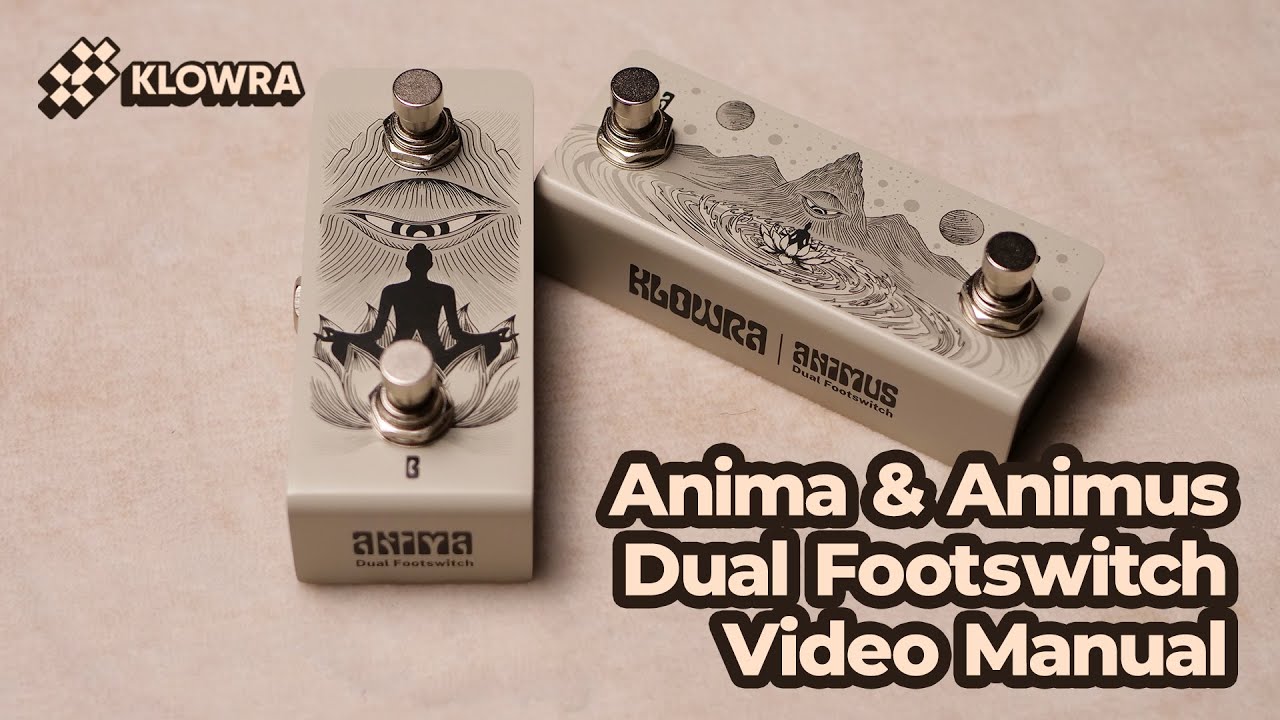
Anima & Animus Footswitches - Exploring Demo | KLOWRA
We are always talking about 2-step—the signature feature within the Vein Pitch Shifter and Limbo Reverb. To unlock the full potential of 2-step with ease, a dual footswitch is essential. Joining the Bloom Infinity Series as our cosmic expansion, Anima and Animus offer two distinct paths of control: - Anima: A meditative vertical layout that sinks quietly into your board. Each press is like the universe opening and closing its eye. - Animus: A wide horizontal horizon featuring dual TS and single TRS outputs to command up to three devices simultaneously. Both feature a passive, no-power design with an included TRS MAP for flexible A/B routing. Plug in, and navigate your universe. 00:00 - 00:07 Intro 00:07 - 00:10 Stuff in Anima's box 00:10 - 00:17 Close shot of Anima 00:17 - 00:31 Connection tutorial 00:31 - 00:47 TRS MAP Switch 00:47 - 01:14 Demo of Anima 01:14 - 01:27 Stuff in Animus' box 01:27 - 01:50 Connection tutorial 02:05 - 02:15 Simultaneously Tap two pedals 02:15 - 02:24 Animus's routing 02:24 - 02:54 Demo of Animus More info here https://www.klowra.com/anima-dual-footswitch https://www.klowra.com/anima-dual-footswitch Thx for watching. 💐 Follow Klowra Youtube/ @KlowraPedals Facebook/ https://www.facebook.com/klowra Instagram/ https://www.instagram.com/klowra_pedals/ TikTok/ https://www.tiktok.com/@klowra_pedals #klowra #klowrapedals #guitarpedals #guitareffects #effectpedals #footswitch
Play Video
Play Video
02:31
Mantra Dual Expression Pedal - Exploring Demo | KLOWRA
For the Klowra pedal, the Ramp function is undoubtedly one of its most brilliant hidden features. To elevate the Ramp experience for both Klowra users (especially our own team members), the Mantra Dual EXP was born. Tap and press, the All-Seeing Eye flowers cluster blooms in full glory. 00:00 - 00:07 Intro 00:07 - 00:09 Stuff in the box 00:12 - 00:17 Mantra's feature 00:17 - 00:34 Correct connection example 00:34 - 00:42 Incorrect connection example 00:42 - 01:00 Direction Switches 01:00 - 01:28 Control two Klowra pedals 01:28 - 01:44 Compatible with multi-effects pedal 01:44 - 02:30 Control two Klowra pedals demo More info here https://www.klowra.com/mantra-dual-expression-pedal Thx for watching. 💐 Follow Klowra Youtube/ @KlowraPedals Facebook/ https://www.facebook.com/klowra Instagram/ https://www.instagram.com/klowra_pedals/ TikTok/ https://www.tiktok.com/@klowra_pedals #klowra #klowrapedals #guitarpedals #guitareffects #effectpedals
Play Video
Play Video
01:12
Vires Power Supply - Exploring Demo | KLOWRA
In this video, we’ll take an in-depth look at the Klowra Vires Guitar Pedal Power Supply. While it lacks the complexity of Klowra’s pedals, its stability, versatility, and sleek design ensure it is a worthy addition to your high-stakes pedalboard real estate. More info here https://klowra.com/vires-power-supply Thx for watching. 💐 Follow Klowra Youtube/ @KlowraPedals Facebook/ https://www.facebook.com/klowra Instagram/ https://www.instagram.com/klowra_pedals/ TikTok/ https://www.tiktok.com/@klowra_pedals #klowra #klowrapedals #guitarpedals #guitareffects #effectpedals
Play Video
Play Video
07:19
Verdict Poly Octaver - Exploring Demo | KLOWRA
Finally, the Holy Carrot on Christmas tree unveiled - Klowra Verdict Poly Octaver. Join us as we break down the panel controls and explore its hidden depths. 00:00 - 00:19 Intro 00:19 - 00:36 +OCT 00:36 - 00:49 +2OCT 00:49 - 01:04 DIRECT 01:04 - 01:14 -OCT 01:14 - 01:26 -2OCT 01:26 - 01:39 FREQ 01:39 - 01:54 Hidden Parameters 02:02 - 02:46 Baroque Violin / Dry Path Mode 02:46 - 03:50 Bach Organ / Envelop Filter 03:50 - 04:44 Freeze / Freeze Release 04:44 - 05:25 Ramp 05:25 - 06:00 Ramp Lock 06:00 - 06:41 External Footswitch 06:41 - 07:18 External EXP More info here https://www.klowra.com/verdict-poly-octaver Thx for watching. 💐 Follow Klowra Youtube/ @KlowraPedals Facebook/ https://www.facebook.com/klowra Instagram/ https://www.instagram.com/klowra_pedals/ TikTok/ https://www.tiktok.com/@klowra_pedals #klowra #klowrapedals #guitarpedals #guitareffects #effectpedals #octave #pitchshift #pipeorgan #violin
Play Video
Play Video
06:13
Rilum Multi-head Delay - Advanced Manual | KLOWRA
This video dives deep into the hidden layers of Rilum Multi-head Delay, unveiling its secret features and sonic possibilities. Chapters: 00:00 Adjusting Hidden Parameters 00:33 Ramp 01:50 Tap Tempo & Twisted Tempo 03:13 Bypass & Trails Mode 03:55 External Footswitch 05:30 External Pedal More info here https://www.klowra.com/rilum-multi-head-delay Thx for watching. 💐 Follow Klowra Youtube/ @KlowraPedals Facebook/ https://www.facebook.com/klowra Instagram/ https://www.instagram.com/klowra_pedals/ TikTok/ https://www.tiktok.com/@klowra_pedals #klowra #klowrapedals #guitarpedals #guitareffects #effectpedals #delaypedal #wildseed #wildseedengine
Play Video
Play Video
03:41
Rilum Multi-head Delay - Panel Manual | KLOWRA
This video walks you through the core parameters and basic functions of the Klowra Rilum Multi-head Delay, giving you a direct experience of the charm and versatility of this multi-head delay. Chapters: 00:00 LAG TIME 01:03 FEEDBACK 01:28 MIX 01:47 RATE 01:54 HEADS VOL 02:28 LO-FI 02:38 THROUGH-ZERO FLANGER 03:02 CHORUS STACK 03:20 THE EDGE OF SELF-OSCILLATION More info here https://www.klowra.com/rilum-multi-head-delay Thx for watching. 💐 Follow Klowra Youtube/ @KlowraPedals Facebook/ https://www.facebook.com/klowra Instagram/ https://www.instagram.com/klowra_pedals/ TikTok/ https://www.tiktok.com/@klowra_pedals #klowra #klowrapedals #guitarpedals #guitareffects #effectpedals #delaypedal #wildseed #wildseedengine
Play Video
Play Video
03:30
Limbo Reverb - Exploring Demo | KLOWRA
Congratulations, you’re watching the very first video of our very first product. Introducing Limbo Reverb, the firstborn of Klowra’s debut series: Bloom Infinity. In this video, you'll follow our hands (and our editor’s occasional complaints) as we walk you through all the parameters and features of Limbo Reverb. Chapters: 00:00 Overview 01:10 Sound of Freeze / Infinity 01:16 How to Freeze / Infinity 01:53 Sound of Ramp 02:37 How to Ramp More info here https://www.klowra.com/limbo-reverb Thx for watching. 💐 Follow Klowra Youtube/ @KlowraPedals Facebook/ https://www.facebook.com/klowra Instagram/ https://www.instagram.com/klowra_pedals/ TikTok/ https://www.tiktok.com/@klowra_pedals #klowra #klowrapedals #guitarpedals #guitareffects #effectpedals #reverbpedal
bottom of page